Smart locks have become one of the most popular smart home upgrades — and for good reason. No more fumbling for keys, no more hiding spare keys under the mat, and full control over who can access your home and when.
We’ve tested the top smart locks of 2026 to find the best options for every budget and use case.
Best Smart Locks at a Glance
| Lock | Best For | Price | Rating |
|---|---|---|---|
| August WiFi Smart Lock (4th Gen) | Overall | $229.99 | 4.2/5 |
| Schlage Encode Plus | Apple HomeKit | $299.99 | 4.4/5 |
| Yale Assure Lock 2 | Design | $219.99 | 4.3/5 |
| Ultraloq U-Bolt Pro | Fingerprint | $169.99 | 4.1/5 |
| Kwikset Halo Touch | Budget | $179.99 | 4.0/5 |
1. August WiFi Smart Lock (4th Gen) — Best Overall
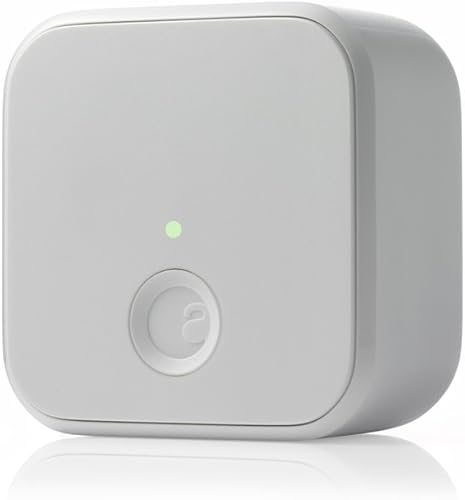
- Built-in WiFi, no bridge required
- Auto-lock and auto-unlock
- Works with existing deadbolt
- Remote access from anywhere
The August WiFi Smart Lock earns our top spot because it works with your existing deadbolt — no need to replace your entire lock or give up your physical keys. The built-in WiFi means no bridge or hub required, and the DoorSense technology can tell you if your door is actually closed and locked.
The auto-lock and auto-unlock features work seamlessly: the lock detects when you leave and locks behind you, then unlocks as you approach with your phone.
What We Like
- Keeps your existing keys and deadbolt
- Built-in WiFi — no bridge needed
- Auto-lock and auto-unlock work great
- Works with Alexa, Google, and HomeKit
Could Be Better
- Premium price at $229.99
- Battery life is 3-6 months
- Interior unit is visible inside
Our Verdict: If you want the easiest upgrade path to a smart lock without replacing your existing hardware, the August WiFi Smart Lock is the clear winner. Read our full August WiFi Smart Lock review for an in-depth look at battery life, DoorSense, and long-term performance.
Smart Lock Buying Guide
Types of Smart Locks
Retrofit locks (like August) attach to your existing deadbolt. You keep your keys and your exterior hardware looks unchanged.
Replacement locks (like Schlage, Yale) replace your entire deadbolt. They typically offer more features like built-in keypads and fingerprint readers, but require full installation.
Connectivity Options
- WiFi: Direct connection, remote access without a hub. Higher battery drain.
- Bluetooth: Low power, fast local unlock. No remote access without a hub.
- Z-Wave/Zigbee: Requires a smart home hub (SmartThings, Hubitat). Very reliable.
- Matter/Thread: The newest standard. Works across platforms natively.
Key Features to Look For
- Auto-lock/unlock: Automatically secures the door when you leave
- Guest access: Share temporary or scheduled access codes
- Activity log: Track who locked/unlocked and when
- Backup entry: Keypad, key, or emergency power option
- Smart home integration: Alexa, Google, HomeKit compatibility
FAQ
Are smart locks safe?
Yes. Modern smart locks use AES-128 or AES-256 encryption, making them extremely difficult to hack. The physical lock mechanism is typically the same grade as traditional deadbolts.
What happens if the battery dies?
All good smart locks include a backup entry method — either a physical key, an emergency USB power port, or a 9V battery terminal on the exterior.
Can smart locks be picked?
Smart locks are just as pick-resistant as traditional deadbolts — the “smart” part is the electronic mechanism, not the physical lock cylinder. Look for ANSI Grade 1 or Grade 2 ratings.
Final Thoughts
Smart locks are one of the best investments you can make for both convenience and security. The August WiFi Smart Lock is our top recommendation for most homeowners, but if you want a built-in fingerprint reader, check out the Ultraloq U-Bolt Pro. For a deeper dive into every feature and specification to compare, see our smart lock buying guide.