Smart locks are one of the fastest-growing categories in home security, and for good reason. They eliminate the need for physical keys, give you remote control over your deadbolt, and let you hand out temporary access codes to guests, dog walkers, and delivery services. Paired with a video doorbell, a smart lock turns your front door into a fully connected entry point. But with dozens of models on the market using different connectivity standards, form factors, and smart home integrations, choosing the right one can be overwhelming.
This guide breaks down everything you need to know before you spend a dollar.
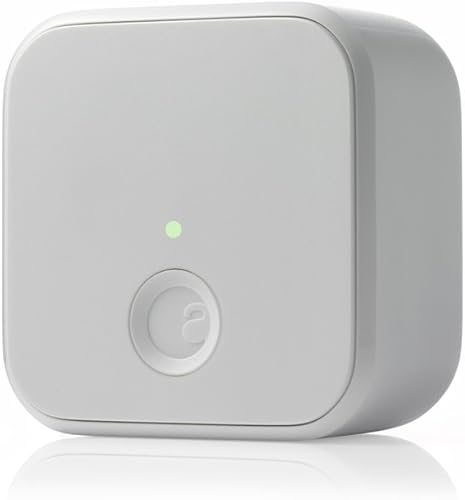
- Built-in WiFi, no bridge required
- Auto-lock and auto-unlock
- Works with existing deadbolt
- Remote access from anywhere
Types of Smart Locks
Not all smart locks are built the same way. The type you choose determines how much work installation requires and how your door looks when it is done.
Retrofit Smart Locks
A retrofit lock attaches to the inside of your existing deadbolt. You keep your current keys, your exterior hardware stays unchanged, and installation takes about 10 minutes with a screwdriver. The August WiFi Smart Lock is the most popular example.
Best for: Renters, homeowners who want to keep their existing keys, and anyone who prefers a minimally invasive upgrade.
Drawback: No built-in keypad or fingerprint reader on the outside. You unlock with your phone, voice assistant, or physical key.
Deadbolt Replacement Locks
These replace your entire deadbolt assembly. You remove your old lock and install the new one in its place. Models like the Schlage Encode Plus, Yale Assure Lock 2, and Kwikset Halo fall into this category.
Best for: Homeowners who want an all-in-one solution with keypads, fingerprint readers, or both built directly into the exterior hardware.
Drawback: More complex installation (20-40 minutes), and you lose your existing keys since the new lock has its own keyway or may be entirely keyless.
Smart Handle Sets
A newer category that replaces your entire door handle and deadbolt with a single smart unit. These are more common in Europe and for commercial applications but are gaining traction in the US market.
Best for: New construction or full door hardware upgrades where aesthetics matter.
Drawback: Highest cost ($300-500+) and most involved installation.
Connectivity: How Your Lock Talks to Your Phone
The connectivity protocol determines how you interact with your lock, what features are available remotely, and how it fits into your smart home.
Connectivity Comparison Chart
| Protocol | Range | Remote Access | Hub Required | Battery Impact | Best For |
|---|---|---|---|---|---|
| Bluetooth | 30-40 feet | No (without hub) | Optional | Very Low | Basic local unlock |
| WiFi | Whole network | Yes, built-in | No | High | Remote access, simple setup |
| Z-Wave | 30-100 feet | Yes (via hub) | Yes | Low | SmartThings/Hubitat users |
| Zigbee | 30-75 feet | Yes (via hub) | Yes | Low | SmartThings/Hubitat users |
| Matter/Thread | 30-100 feet | Yes (via hub) | Border router | Low | Future-proofing, cross-platform |
Bluetooth is the baseline. Nearly every smart lock includes it for close-range phone unlock. On its own, Bluetooth does not provide remote access — you need to be within 30-40 feet. Some locks offer a WiFi bridge accessory to add remote capability.
WiFi is the most convenient for standalone use. The lock connects directly to your router, so you can lock, unlock, and check status from anywhere. The trade-off is higher battery consumption — expect to replace batteries every 3-6 months instead of 6-12 months.
Z-Wave and Zigbee are the protocols of choice for dedicated smart home hubs like SmartThings, Hubitat, or Home Assistant. They are extremely reliable, use very little power, and support advanced automations. The downside is that you must own a compatible hub.
Matter/Thread is the newest standard backed by Apple, Google, Amazon, and Samsung. It promises universal compatibility across all major platforms. In 2026, Matter-compatible locks are available from Yale, Schlage, and others. If you are building a new smart home from scratch, Matter is the most future-proof choice.
Smart Home Compatibility
Before you buy, make sure the lock works with your existing ecosystem.
| Ecosystem | Top Compatible Locks |
|---|---|
| Amazon Alexa | August WiFi, Schlage Encode Plus, Yale Assure Lock 2, Kwikset Halo |
| Google Home | August WiFi, Yale Assure Lock 2, Kwikset Halo |
| Apple HomeKit | Schlage Encode Plus, Yale Assure Lock 2, Level Lock+ |
| Samsung SmartThings | All Z-Wave/Zigbee locks, August WiFi, Yale, Schlage |
| Matter | Yale Assure Lock 2, Schlage Encode Plus (with update) |
The safest bet for multi-platform homes: The August WiFi Smart Lock works with Alexa, Google, and HomeKit out of the box with no hub required. The Yale Assure Lock 2 offers the most protocol options, with WiFi, Bluetooth, Z-Wave, Zigbee, and Matter modules available. Not sure which ecosystem to commit to? Our guide to choosing the right smart home hub can help you decide.
Security Features That Matter
Encryption
Every reputable smart lock uses AES-128 or AES-256 encryption for wireless communication. This is the same encryption standard used by banks. The lock-to-phone and lock-to-cloud channels are both encrypted, making over-the-air interception effectively impossible.
Look for locks that have undergone third-party security audits or hold certifications from organizations like UL or BHMA.
Auto-Lock
Auto-lock automatically engages the deadbolt after a set time (typically 30 seconds to 5 minutes) or when the door closes. This is one of the most valuable features in a smart lock because it eliminates the “did I lock the door?” anxiety entirely.
The best implementations use a door sensor (like August’s DoorSense) to detect when the door is physically closed before locking, which prevents the deadbolt from firing into open air.
Guest and Temporary Codes
Most keypad-equipped smart locks let you create unique PIN codes for different people. Advanced models offer:
- Scheduled codes that only work during specific hours (great for a weekly cleaning service)
- One-time codes that expire after a single use (perfect for deliveries)
- Recurring codes tied to specific days of the week
- Activity logging that records which code was used and when
This level of access control was previously only available in commercial buildings.
Tamper Alerts
Good smart locks send a push notification if someone attempts to force the lock, picks the cylinder, or enters incorrect codes multiple times. Some models also have built-in alarms that trigger a loud tone during a tamper event.
Battery Life Expectations
Battery life is the most common concern with smart locks, and manufacturers’ claims are optimistic at best. Here is what you can realistically expect:
| Lock Type | Claimed Battery Life | Real-World Battery Life |
|---|---|---|
| Bluetooth only | 12 months | 8-12 months |
| WiFi | 6 months | 3-6 months |
| Z-Wave/Zigbee | 12 months | 8-12 months |
| Matter/Thread | 12 months | 6-10 months |
Factors that drain batteries faster:
- High traffic (a lock used 20+ times per day will drain faster than one used 5 times per day)
- WiFi connectivity (constant connection to your router draws more power than Bluetooth)
- Cold weather (batteries lose capacity below 32 degrees F / 0 degrees C)
- Video features (some locks with built-in cameras drain significantly faster)
Pro tip: Always keep a spare set of batteries on hand. Most smart locks use 4x AA batteries, and when they die, you are locked out of the smart features until you replace them. Every good lock includes a physical key or emergency power option as a backup.
Installation Difficulty
| Lock Type | Difficulty | Time | Tools Needed |
|---|---|---|---|
| Retrofit (August, Level) | Easy | 10-15 min | Screwdriver |
| Deadbolt replacement (Schlage, Yale) | Moderate | 20-40 min | Screwdriver, tape measure |
| Handle set | Moderate-Hard | 30-60 min | Drill, screwdriver, chisel (sometimes) |
Before you buy, measure your door:
- Door thickness: Most smart locks fit doors 1-3/8” to 1-3/4” thick. Thicker doors may need an extension kit.
- Backset: The distance from the edge of the door to the center of the deadbolt hole. Standard is 2-3/8” or 2-3/4”.
- Cross bore diameter: The large hole through the door should be 2-1/8” for standard deadbolts.
If your measurements match these standards, virtually any smart lock will fit.
What We Like
- Keyless convenience eliminates lockouts
- Grant and revoke access remotely
- Activity logs show exactly who entered and when
- Auto-lock ensures your door is always secured
- Works with voice assistants for hands-free control
Could Be Better
- Battery replacement every 3-12 months depending on type
- WiFi models may be unreliable during internet outages
- Quality models cost $150-300+
- Some features require a monthly subscription
Frequently Asked Questions
Can smart locks be hacked?
In theory, any wireless device can be targeted. In practice, AES-256 encrypted smart locks from reputable brands have never been breached through their wireless protocols in any documented real-world attack. The physical lock cylinder remains the more vulnerable component, just like any traditional deadbolt. Choose a lock with ANSI/BHMA Grade 1 or Grade 2 certification for the strongest physical security.
What happens during a power outage?
Smart locks run on batteries, not your home’s electrical system, so a power outage does not affect them at all. You will lose remote access if your WiFi router goes down, but Bluetooth unlock and keypad codes still work normally.
Do smart locks work in cold weather?
Yes, but battery life decreases in extreme cold. If you live in a climate where temperatures regularly drop below 0 degrees F (-18 degrees C), choose a lock rated for extreme temperatures and plan on changing batteries more frequently during winter months.
Can I install a smart lock on a rental?
Absolutely. Retrofit locks like the August WiFi Smart Lock are perfect for rentals because they attach to your existing deadbolt without permanent modification. When you move out, remove the smart lock, reattach the original thumbturn, and your landlord will never know.
Do I need a smart home hub?
Not necessarily. WiFi and Bluetooth locks work directly with your phone. You only need a hub if you choose a Z-Wave or Zigbee lock, or if you want to build complex automations (like “unlock the door and turn on the lights when I arrive”).
Check August WiFi Smart Lock Price on AmazonBottom Line
The best smart lock for you depends on your living situation, your smart home ecosystem, and how much installation work you are willing to do. For most homeowners, a WiFi-enabled deadbolt replacement with a keypad strikes the best balance of convenience, security, and features. For renters or anyone who wants the simplest possible upgrade, a retrofit lock like the August WiFi Smart Lock is the way to go.
Whatever you choose, make sure the lock supports your preferred smart home platform, has a backup entry method, and uses AES-128 or stronger encryption. Those three criteria will steer you away from the cheap, insecure options and toward a lock you can trust. Ready to shop? See our best smart locks of 2026 for our top-rated picks.