Ring and Google Nest are the two biggest names in video doorbells, and choosing between them is one of the most common decisions homeowners face when upgrading their front door. The Ring Video Doorbell 4 and the Google Nest Doorbell (Battery) are both excellent products, but they cater to different ecosystems and prioritize different features. We tested both side by side for over three months to give you a definitive answer.
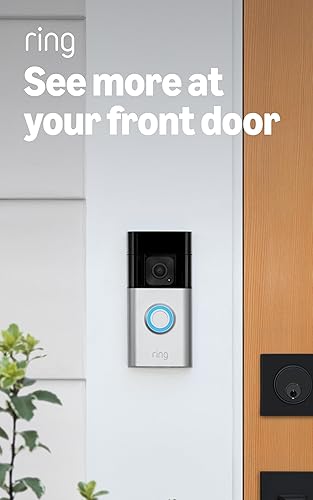
- 1080p HD video with HDR
- Pre-Roll Video previews
- Two-way talk with noise cancellation
- Customizable motion zones
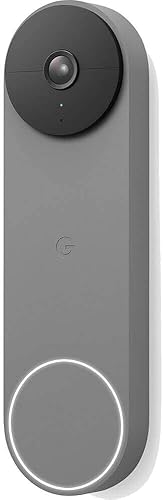
- HDR video with 3:4 aspect ratio for head-to-toe view
- On-device intelligent alerts for people, packages, animals, and vehicles
- 3 hours of free event video history
- Wire-free battery or hardwired installation
Video Quality
Ring Video Doorbell 4 records at 1080p with HDR in a standard 16:9 landscape format. The image is sharp, colors are natural, and the HDR processing handles high-contrast scenes — such as a person standing in front of a bright sky — noticeably well. Faces are clearly identifiable at distances up to 20 feet.
Google Nest Doorbell (Battery) records at 960 x 1280 in a taller 3:4 portrait format. This aspect ratio is intentional: it captures more of the vertical space in front of your door, so you can see packages on the ground and a person’s full body in the same frame. Resolution is technically lower than 1080p, but the image quality is still very good, and the portrait framing is genuinely useful for doorbell purposes.
Winner: Tie. Ring has a slight edge in raw resolution and HDR, but Nest’s portrait format captures more relevant detail for a doorbell camera. Both produce footage that is more than adequate for identifying visitors and capturing events.
Night Vision
Both doorbells offer infrared night vision that produces clear black-and-white footage in complete darkness. Ring also has a color night vision mode that uses ambient light to produce color footage in low-light conditions — but it requires at least some light from a porch lamp or streetlight to be effective. In total darkness, both default to infrared.
Winner: Ring, thanks to the optional color night vision mode.
Smart Features and Detection
This is where the two doorbells diverge significantly.
Ring Video Doorbell 4 offers:
- Customizable motion zones
- People-only detection
- Package detection (Ring Protect Plus required)
- Pre-Roll Video: 4 seconds of black-and-white footage captured before the motion event
- Quick Replies: pre-recorded messages for when you cannot answer
Google Nest Doorbell (Battery) offers:
- Intelligent alerts that distinguish between people, packages, animals, and vehicles — built in at no extra cost
- Familiar face detection (Nest Aware subscription required)
- Activity zones
- Up to 3 hours of free rolling event history, stored on-device, no subscription needed
The Nest Doorbell’s on-device AI is impressive. Out of the box and without a subscription, it tells you whether the alert is a person, a package, an animal, or a vehicle. Ring requires a subscription to unlock package detection and relies on cloud processing for its smart alerts.
However, Ring’s Pre-Roll Video is a standout feature. Those 4 seconds of footage before the trigger event provide critical context — you see the person walking up, not just standing at the door. No other doorbell at this price point matches this.
Winner: Google Nest for free smart detection out of the box. Ring if you value Pre-Roll Video above all else.
Head-to-Head Comparison
| Feature | Ring Video Doorbell 4 | Google Nest Doorbell (Battery) |
|---|---|---|
| Resolution | 1080p HDR (16:9) | 960x1280 (3:4 portrait) |
| Night Vision | IR + Color night vision | IR only |
| Pre-Roll | Yes (4 sec B&W) | No |
| Free Storage | None (live view only) | 3 hours on-device |
| Person Detection | Yes (subscription) | Yes (free, on-device) |
| Package Detection | Yes (Ring Protect Plus) | Yes (free, on-device) |
| Vehicle/Animal Detection | No | Yes (free, on-device) |
| Familiar Faces | No | Yes (Nest Aware required) |
| Battery Life | 3-5 months | 2-4 months |
| Hardwired Option | Yes | Yes |
| Smart Assistant | Alexa | Google Assistant |
| HomeKit Support | No | No |
| Price | ~$199.99 | ~$179.99 |
Ecosystem and Voice Assistant
This might be the single most important factor in your decision.
Ring is an Amazon company. It integrates deeply with Alexa and Echo devices. If you have an Echo Show, you can say “Alexa, show me the front door” and get a live view instantly. Ring also connects to other Amazon devices like Blink cameras and Eero routers for a unified security setup.
Google Nest integrates with the Google Home ecosystem. If you have Nest Hub displays, Chromecast, or Google Home speakers, the Nest Doorbell fits seamlessly. Doorbell events show up automatically on Nest Hub displays, and you can talk to visitors through any Google smart speaker.
Neither doorbell supports Apple HomeKit natively. If you are an Apple household, both options require workarounds, and neither will feel truly integrated.
Winner: Depends entirely on your ecosystem. Alexa household = Ring. Google household = Nest.
Battery Life
Ring Video Doorbell 4 delivers roughly 3-5 months of battery life under normal use. The removable battery design means you can buy a spare battery and swap them out with zero downtime. Recharging takes about 6-8 hours via micro-USB.
Google Nest Doorbell (Battery) lasts approximately 2-4 months in our testing, depending on traffic and detection settings. The battery is built-in, meaning you need to remove the entire doorbell from its mount to charge it via USB-C. Charging takes about 4-5 hours.
Winner: Ring. Longer battery life plus the ability to swap batteries without removing the doorbell gives it a clear advantage.
Subscription Costs
Ring Protect:
- Basic: $3.99/month — 180 days of video history for one device
- Plus: $10/month — All devices, professional monitoring, extended warranty
Without a subscription, Ring lets you see live video and get motion alerts, but you cannot save or review any recorded footage.
Google Nest Aware:
- Nest Aware: $6/month — 30 days of event video history
- Nest Aware Plus: $12/month — 60 days of event history + 10 days continuous recording (wired only)
Without a subscription, Nest still provides 3 hours of free on-device event storage and full smart detection. This is a significant advantage for budget-conscious buyers.
Winner: Google Nest. The free 3-hour event history and no-cost smart detection make it far more useful without a subscription. Ring is essentially a live-view-only device without Ring Protect.
Installation
Both doorbells install in under 15 minutes. Ring includes a level, drill bit, and all necessary hardware. Google Nest includes a similar hardware kit with an angled wedge for adjusting the viewing angle. Both apps walk you through every step — or you can follow our complete video doorbell installation guide for detailed instructions.
If you have existing doorbell wiring, both can be hardwired for continuous charging. Battery installation for both requires just two screws.
Winner: Tie. Both are genuinely easy to install yourself.
What We Like
- Ring: Pre-Roll Video for event context
- Ring: Longer battery life with swappable batteries
- Ring: Deep Alexa and Echo Show integration
- Nest: Free smart detection (people, packages, vehicles, animals)
- Nest: 3 hours of free event storage without a subscription
- Nest: Lower upfront price
Could Be Better
- Ring: Requires subscription for any video storage
- Ring: No package/vehicle/animal detection without Ring Protect Plus
- Nest: Shorter battery life with no swap option
- Nest: No Pre-Roll Video equivalent
- Neither: No Apple HomeKit support
Who Should Buy Which?
Get the Ring Video Doorbell 4 if:
- You are already invested in the Amazon/Alexa ecosystem
- Pre-Roll Video is important to you for full event context
- You want longer battery life with the option to swap batteries
- You have an Echo Show and want hands-free video monitoring
- You are comfortable paying $3.99/month for Ring Protect Basic
Get the Google Nest Doorbell (Battery) if:
- You use Google Home, Nest Hub, or Google Assistant regularly
- You want smart detection (people, packages, vehicles, animals) without paying a subscription
- You want usable event storage included for free
- You prefer the portrait video format that shows full-body and packages
- You want the lower upfront cost
Final Verdict
Both the Ring Video Doorbell 4 and the Google Nest Doorbell (Battery) are excellent video doorbells that will serve most homeowners well. For detailed scores and test results on the Ring, read our full Ring Video Doorbell 4 review. The decision comes down to ecosystem and subscription tolerance.
If you live in an Alexa household and do not mind paying for Ring Protect, the Ring Video Doorbell 4 offers superior video quality, Pre-Roll Video, and better battery life. If you live in a Google household and want to minimize recurring costs, the Nest Doorbell’s free smart detection and on-device storage make it the smarter financial choice.
Our recommendation for most people: Google Nest Doorbell (Battery) — the free smart features and lower total cost of ownership give it the edge unless you specifically need Alexa integration or Pre-Roll Video. For more options including Arlo and Eufy, see our full best video doorbells of 2026 roundup.
Ring Video Doorbell 4 on Amazon Google Nest Doorbell on Amazon