Home Security System Buying Guide
As a homeowner, your family’s safety and security should be top priority. A reliable home security system can provide peace of mind, protect your loved ones, and deter potential intruders. With numerous options available in the market, choosing the right system for your needs can be overwhelming. In this comprehensive guide, we’ll walk you through the essential steps to find the perfect home security system for your home.
What You Need to Know
Before diving into the specifics of home security systems, it’s crucial to understand what matters most when selecting a system. A good home security system should provide robust protection against intruders, reliable connectivity, and user-friendly features that cater to your needs. In this guide, we’ll explore key considerations such as local storage, AI processing, smart detection, and professional monitoring options.
When evaluating home security systems, consider the following essential components:
- Local storage: Look for systems with robust local storage capacity, allowing you to store recorded footage and system data without relying on cloud services.
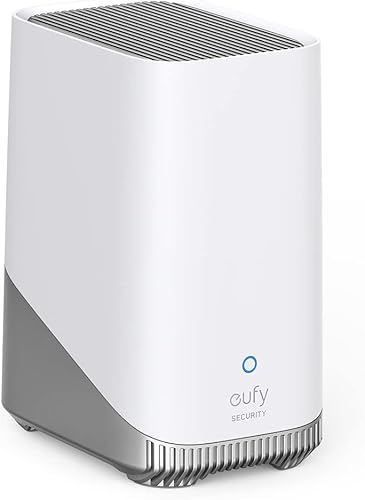
- AI processing: BionicMind AI-powered systems like eufy’s S380 HomeBase 3 offer enhanced smart detection features, including facial recognition and personalized alerts.
- Connectivity: Reliable connectivity is vital for seamless communication between devices. Ensure the system supports a stable internet connection or offers cellular backup options.
Step 1: Determine Your Security Needs
Before choosing a home security system, assess your specific needs based on factors like:
- Property size and layout
- Number of family members and pets
- Valuables to protect (e.g., jewelry, art pieces)
- Desire for smart home integrations
- Budget for equipment and potential subscription fees
Consider the following scenarios:
- Small apartment or condo: A basic system with entry sensors and a compact hub might suffice.
- Large estate or rural property: A more extensive system with multiple cameras, motion detectors, and reliable cellular backup may be necessary.
Step 2: Evaluate System Features and Capabilities
When evaluating specific systems, examine the following features:
- Number of devices supported (e.g., cameras, sensors, video doorbells)
- Expandable storage options for local data storage
- AI processing capabilities (e.g., facial recognition, smart detection)
- Connectivity options (e.g., WiFi, cellular, Zigbee/Z-Wave support)
- Smart home integrations with popular platforms like Amazon Alexa or Google Assistant
Step 3: Consider Professional Monitoring and Subscription Fees
Some systems require monthly subscription fees for professional monitoring services. Evaluate the costs and benefits of these plans:
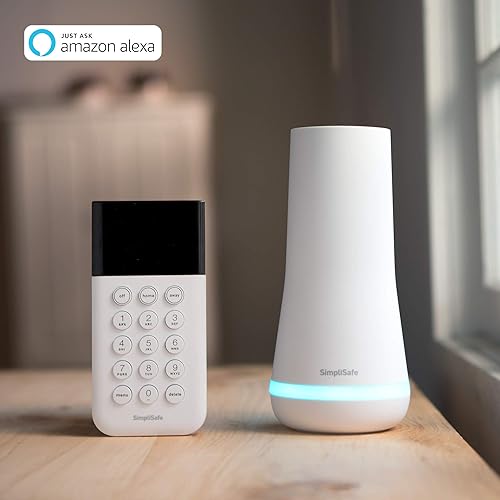
- SimpliSafe’s Essentials System offers affordable monitoring plans starting at $0.50/day, but requires a separate contract.
- eufy’s S380 HomeBase 3 system does not charge monthly subscription fees for core features, relying on local storage and AI processing.
Common Mistakes to Avoid
When choosing a home security system, be aware of the following common mistakes:
- Insufficient local storage: Relying solely on cloud services can compromise data integrity and create storage limitations.
- Limited smart home integrations: Ensure the system supports your desired smart devices and platforms for seamless integration.
- Inadequate cellular backup: Failing to account for internet connectivity issues can leave your system vulnerable.
Frequently Asked Questions
Q: Do I need a landline or phone line for my home security system?
A: No, most modern systems use cellular or wireless communication protocols, eliminating the need for a landline. However, some systems may require a WiFi connection for optimal performance.
Q: Can I integrate my existing smart devices with a new home security system?
A: It depends on the specific system and its compatibility with your existing devices. Some systems offer easy integration with popular platforms like Amazon Alexa or Google Assistant.
Summary
Selecting the right home security system requires careful consideration of your unique needs, property layout, and desired features. By understanding key components, evaluating system capabilities, and avoiding common mistakes, you’ll be well-equipped to find a reliable system that safeguards your family’s safety and security. Remember to assess local storage capacity, AI processing, connectivity options, and professional monitoring plans when making your final decision.
Ready to see our tested picks? Check out our best DIY home security systems roundup, or explore systems with no monthly fees if you want to avoid subscription costs entirely.