Dead zones are the enemy of every smart home. One unreachable corner and your security camera drops offline, your video doorbell lags, or your smart lock fails to respond. A mesh WiFi system solves this by blanketing your entire home in a single, seamless wireless network — and the 2026 options are the best we have ever tested.
We evaluated over a dozen mesh systems across real-world homes ranging from 1,200 to 5,000 square feet. Below are the five that earned our recommendation.
Our Top Picks at a Glance
| System | Best For | Price (2-pack) | WiFi Standard | Coverage | Rating |
|---|---|---|---|---|---|
| eero Pro 6E | Overall | $229 | WiFi 6E | 4,000 sq ft | 4.5/5 |
| TP-Link Deco XE75 | WiFi 6E Value | $299 | WiFi 6E | 5,500 sq ft | 4.4/5 |
| Google Nest WiFi Pro | Google Homes | $199 | WiFi 6E | 4,400 sq ft | 4.3/5 |
| ASUS ZenWiFi AX (XT9) | Large Homes | $249 | WiFi 6 | 5,700 sq ft | 4.2/5 |
| TP-Link Deco X55 | Budget | $149 | WiFi 6 | 6,500 sq ft | 4.1/5 |
1. eero Pro 6E — Best Overall Mesh WiFi System
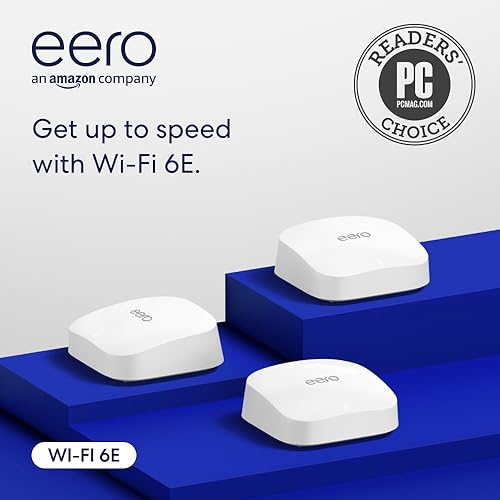
- Tri-band WiFi 6E with 6 GHz band
- Covers up to 2,000 sq ft per unit
- Up to 1 Gbps wired speeds
- Built-in Zigbee smart home hub
The eero Pro 6E is our top pick because it delivers the best combination of speed, simplicity, and smart home integration. The tri-band WiFi 6E architecture adds a dedicated 6 GHz backhaul channel, which keeps your device connections fast even when dozens of gadgets are online.
Setup takes under ten minutes through the eero app. You plug in the first node, follow the on-screen prompts, and add satellite nodes one at a time. There is no web interface to wrestle with and no confusing settings pages. For smart home owners, the built-in Zigbee hub connects compatible sensors, lights, and plugs without requiring a separate bridge.
In our testing, the eero Pro 6E delivered consistent speeds of 450-600 Mbps throughout a 3,200-square-foot home using a 1 Gbps internet connection, with no dead zones in any room including the garage and back patio.
What We Like
- Fastest real-world speeds in our testing
- Built-in Zigbee smart home hub
- Incredibly simple setup and management
- Tri-band WiFi 6E with dedicated backhaul
Could Be Better
- Advanced settings are limited
- eero Plus subscription adds cost ($9.99/mo)
- Only two Ethernet ports per node
Our Verdict: The eero Pro 6E is the mesh system we recommend to most people. It is fast, reliable, and dead simple. If you want whole-home WiFi that just works, this is it. Read our full eero Pro 6E review for detailed performance benchmarks.
2. TP-Link Deco XE75 — Best for WiFi 6E on a Budget
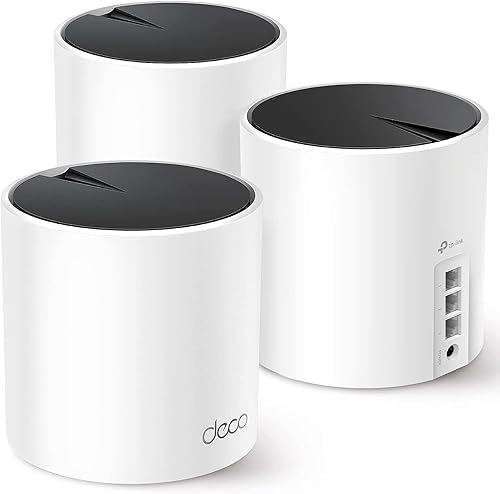
- Tri-band WiFi 6E with AXE5400 speeds
- Covers up to 7,200 sq ft (3-pack)
- AI-driven mesh technology for optimal routing
- TP-Link HomeShield built-in security
The Deco XE75 brings WiFi 6E performance to a more accessible price. Its tri-band design mirrors the eero Pro 6E’s architecture with a dedicated 6 GHz band for backhaul, and TP-Link’s AI-Driven Mesh technology dynamically routes traffic through the fastest path between nodes.
Each node offers three Gigabit Ethernet ports, which is more than most competitors. The Deco app provides parental controls, QoS settings, and built-in antivirus through TP-Link HomeShield. Our speed tests showed 400-550 Mbps at range, with excellent consistency across all three floors of our test home.
The XE75 also supports 160 MHz channel bandwidth on the 5 GHz band, which translates to faster speeds for WiFi 6 devices that cannot use the 6 GHz band yet.
What We Like
- WiFi 6E tri-band at a competitive price
- Three Ethernet ports per node
- AI-Driven Mesh optimizes routing automatically
- Covers up to 5,500 sq ft with two nodes
Could Be Better
- Larger physical footprint than eero
- HomeShield Pro requires $5.99/mo subscription
- No Zigbee or Z-Wave hub built in
Our Verdict: The Deco XE75 is the best WiFi 6E mesh system for buyers who want strong performance without paying eero prices. The extra Ethernet ports make it especially good for home offices and media rooms. For a closer look, see our full TP-Link Deco XE75 review.
3. Google Nest WiFi Pro — Best for Google Homes
If your smart home runs on Google Assistant, the Nest WiFi Pro is the natural choice. It is a WiFi 6E tri-band mesh system with Matter support built in, and every node doubles as a Thread border router — which means it can communicate directly with Thread-enabled smart home devices.
Setup through the Google Home app takes about five minutes, and the system integrates seamlessly with Nest cameras, Nest thermostats, and Chromecast devices. You can prioritize bandwidth for specific devices, run speed tests, and manage parental controls all from the same app you already use to control your smart home.
In our testing, the Nest WiFi Pro delivered 380-500 Mbps at range, with especially low latency that benefits video calls and cloud gaming.
What We Like
- Deep Google Home and Nest integration
- Thread border router in every node
- Matter support for future-proof smart home
- Compact, attractive design fits any room
Could Be Better
- No Ethernet ports on satellite nodes
- Limited advanced networking features
- Only WiFi 6E -- no WiFi 7 upgrade path
4. ASUS ZenWiFi AX (XT9) — Best for Large Homes
The ZenWiFi AX XT9 is built for large homes and heavy device loads. Its tri-band WiFi 6 architecture uses a dedicated 5 GHz backhaul, and each two-pack covers up to 5,700 square feet. For homes over 4,000 square feet, this is the most reliable system we tested.
ASUS includes AiProtection Pro (powered by Trend Micro) at no extra cost, which provides network-level security scanning, malicious site blocking, and infected device quarantine. The ASUS Router app is more advanced than most mesh competitors, offering VPN server and client support, adaptive QoS, and detailed traffic analysis.
What We Like
- Outstanding coverage for large homes
- AiProtection Pro included free
- Advanced features rival standalone routers
- VPN server and client built in
Could Be Better
- No WiFi 6E -- 5 GHz backhaul only
- Setup is slightly more complex than eero
- Larger node size than competitors
5. TP-Link Deco X55 — Best Budget Mesh WiFi
At $149 for a three-pack, the Deco X55 is the most affordable mesh system worth buying. It covers up to 6,500 square feet and supports WiFi 6 with speeds up to 3,000 Mbps. You lose the 6 GHz band and dedicated backhaul of pricier systems, but for most homes with internet speeds under 500 Mbps, the X55 handles everything without breaking a sweat.
Each node has three Gigabit Ethernet ports, and the system supports up to 150 connected devices. HomeShield parental controls are included in the free tier, with advanced features available through the subscription.
What We Like
- Incredible value at $149 for three nodes
- Covers up to 6,500 sq ft
- Three Ethernet ports per node
- Supports 150+ connected devices
Could Be Better
- Dual-band only -- no dedicated backhaul
- WiFi 6, not WiFi 6E
- Slower speeds at long range vs tri-band systems
Mesh WiFi Buying Guide
How Mesh WiFi Works
Traditional routers broadcast from a single point, and signal strength drops the farther you get. A mesh system uses multiple nodes placed around your home that communicate with each other, creating a unified network with consistent coverage everywhere.
Your devices automatically connect to whichever node offers the strongest signal as you move through your home. This handoff is seamless — you will not notice it happening.
Tri-Band vs. Dual-Band
Tri-band systems have three radio bands: 2.4 GHz, 5 GHz, and either a second 5 GHz or a 6 GHz band. The third band acts as a dedicated backhaul channel between nodes, which prevents the mesh communication from competing with your device traffic. This matters most in homes with many devices or internet speeds above 300 Mbps.
Dual-band systems share bandwidth between device traffic and node-to-node communication. They cost less and work perfectly well for smaller homes or slower internet plans.
WiFi 6 vs. WiFi 6E
WiFi 6E adds the 6 GHz frequency band, which is less congested and delivers faster speeds with lower latency. If you live in an apartment or dense neighborhood where many networks compete for airspace, WiFi 6E provides a meaningful advantage. For rural or suburban homes with little interference, WiFi 6 is still excellent.
How Many Nodes Do You Need?
- Under 2,000 sq ft: Two nodes (one router, one satellite)
- 2,000-3,500 sq ft: Two or three nodes
- 3,500-5,000 sq ft: Three nodes
- Over 5,000 sq ft: Three or more nodes, or choose a long-range system like the ASUS ZenWiFi AX
Frequently Asked Questions
Is mesh WiFi better than a traditional router?
For most homes, yes. A single router struggles to cover areas beyond 1,500-2,000 square feet, especially through walls and floors. Mesh systems eliminate dead zones and provide consistent speeds throughout your home. If you have a small apartment, a good standalone router may be enough.
Does mesh WiFi slow down your internet?
A well-designed mesh system introduces minimal overhead. Tri-band systems with dedicated backhaul lose almost no speed between nodes. Dual-band systems may see a 10-20% reduction at the farthest satellite. In either case, the tradeoff is worth it because you gain coverage you did not have before.
Can I mix mesh WiFi brands with my existing router?
Most mesh systems replace your router entirely — the primary node acts as your new router. Some systems (like eero) offer a bridge mode that works alongside an existing router, but for the best performance, let the mesh system handle routing duties.
How important is WiFi 6E for smart home devices?
Most smart home devices (cameras, locks, sensors) use the 2.4 GHz band and do not benefit directly from WiFi 6E. However, WiFi 6E frees up the 5 GHz band by moving your phones and laptops to 6 GHz, which reduces congestion for all your devices — including smart home gear.
Final Verdict
The eero Pro 6E is our top recommendation for 2026. It combines the fastest real-world speeds, the simplest setup experience, and a built-in Zigbee hub that smart home enthusiasts will appreciate. For buyers on a budget, the TP-Link Deco X55 delivers outstanding coverage at a price that is hard to beat.
No matter which system you choose, upgrading to mesh WiFi is one of the best things you can do for your smart home. Reliable connectivity is the foundation everything else depends on — especially for security cameras that stream video around the clock.
This article was last updated on February 28, 2026. Prices and availability may change.